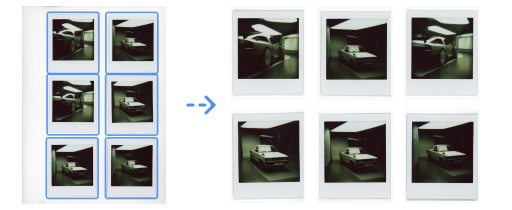
Photos are auto-detected and cropped from each scan
Private by designYour photos stay on this device.
Try sample scans
0 selected
Output review
0 photos
Processing QA
Stage inspector
Step QA
Processing steps
Scroll to an output, then use its arrows to review the processing steps. Tap the image to inspect it full size.
All demos
Final outputs
Review every processed final output without opening the technical details.
0 / 0
Advanced processing details
Source overlays
Pipeline steps
{}
QA Viewbox
Selected output
0 photos
Rename
Enter a new name.
About InstaCropper
About
PurposeInstaCropper turns scanned sheets of Polaroids, prints, and photo batches into separate, cleaned-up image files.
Private by designAll processing happens in your browser. Your photos never leave your device.
Getting started
Drop your scansDrop files here or browse. Add more scans at any time.
Auto-detectionDetected photos appear as cards. Open a thumbnail to review or edit it.
DownloadSelect photos to download, or save the whole project as an .icrop backup.
Help & limits
DetectionLow contrast, glare, overlaps, and scanner shadows may need Adjust crop or Split crop.
Large scansLarge files use more memory after decoding. If recovery cannot be saved, processing stops until you choose Retry.
Browser storageBrowser cleanup can remove saved projects. Download .icrop backups for anything important.
Supported filesImport JPG, PNG, TIFF, WebP, BMP, HEIC, and HEIF when the browser can decode them. Export photos as JPG, PNG, WebP, or TIFF.
Shortcuts are ignored while you type.
Open shortcut guide?
Tools
EditR
AdjustA
DrawB
TextT
LayersL
Crop toolsC
FramesF
DownloadD
Preview
UndoCtrl+Z
RedoCtrl+Shift+Z
Navigate photos:←→
Offset photo:Shift+← ↑ → ↓
Rotate ±0.25°:Ctrl+← →
Reset photo0
ApplyEnter
Play / pause animationSpace
Text / Draw
Move selected text← ↑ → ↓
Duplicate selected textCtrl+D
Delete selected textDel
Brush size[]
Global
SaveCtrl+S
Select allCtrl+A
DeselectCtrl+D
CloseEsc
Adjust
Light
Color
TextText stays above color edits
DrawBrush strokes apply as you draw
Living brushes
Live preview · settings apply to new strokes
Split cropDraw a rectangle around the photo
Adjust crop
-+
ToolsCrop and transform
Layers
Frames
Margin
Download
Still image
Animation
6 seconds total
°
Draw a rectangle around a missed photo
Swatches
Spectrum
Hex#FF3B30
R255
G59
B48
Recently used
Saved projects & storage
Loading saved projects…
Local storage
Checking usage…
No saved sessions yet
Settings
Personalize the interface and privacy defaults.
Appearance
Theme
Light or dark mode. Browser and PWA chrome follow this setting.
Language
Choose the app language.
Privacy
Anonymous usage analytics
Sends anonymous counts for scans, features, downloads, and session length. Never sends images, filenames, or project names.
On
Feedback
Send a bug report
Creates a sanitized report from recent app actions. It never includes images, filenames, project names, raw URLs, or device-identifying text.
Download complete
Your photos are ready
Your files were sent to your browser's download folder.
Support the free app
Wipe recent sessions
This clears local autosaved projects from this browser only.
Recent sessions live in this browser's IndexedDB. Wiping them does not delete files already downloaded to your computer, but it removes the quick restore list for InstaCropper on this device.
Download a backup ZIP first if you may need to restore any of those sessions later.